
Buy to Let Mortgage Borrower Journey UK
From product search to online application and live tracking — explore each step.
Source BTL products nowDiscover how Dynesourcer helps borrowers move from initial buy-to-let mortgage search to product comparison, online application and live tracking — step by step across the full UK borrower journey.
Understand the Buy to Let Mortgage Process
This page explains the full borrower journey for UK buy to let mortgages, from entering property details and viewing product matches to narrowing results with lender criteria, applying online and tracking application progress in real time.
Watch the borrower journey walkthrough to see how the platform supports faster product discovery, shortlisting, online application and live case tracking.
Complete Buy to Let Borrower Flow
Dynesourcer is built to simplify the UK buy to let mortgage process by helping borrowers move from search inputs to shortlisted mortgage products and submitted applications in one connected workflow.
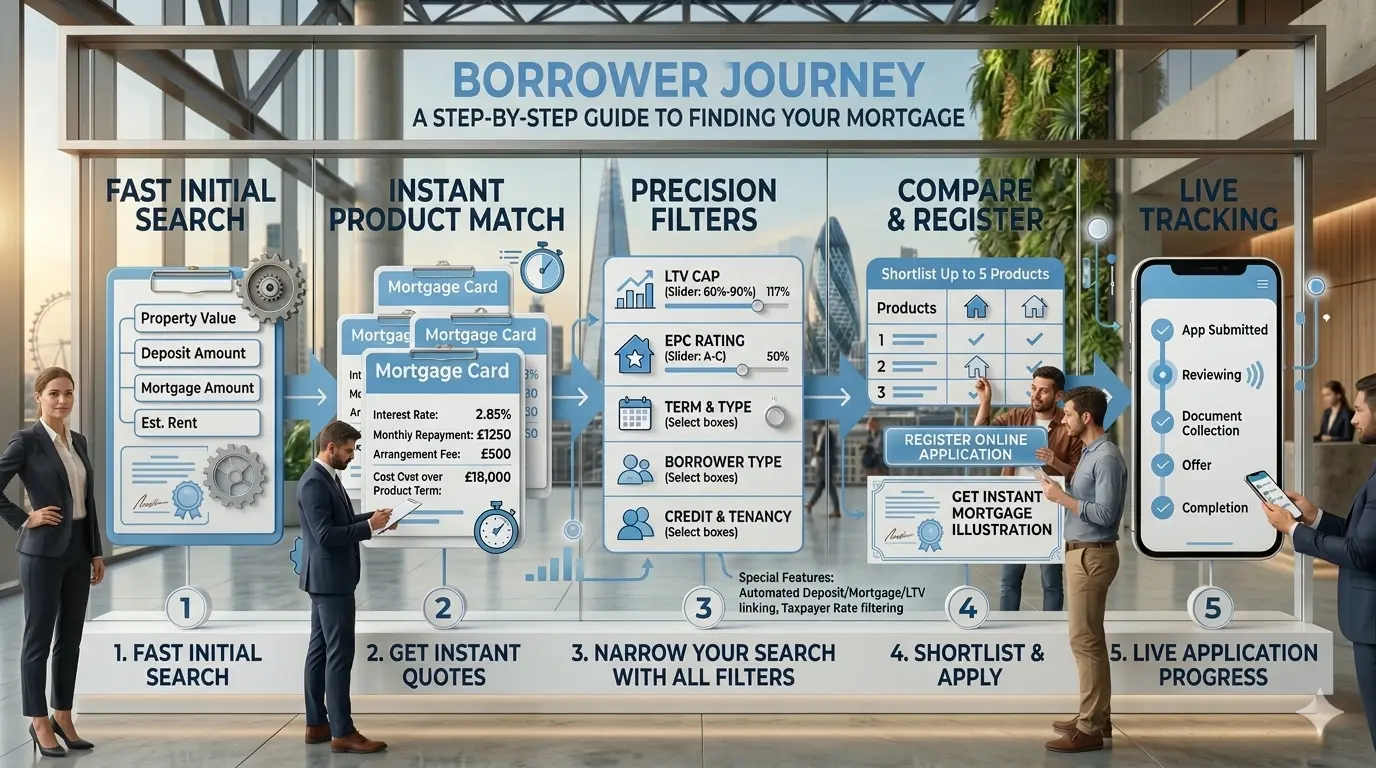
1. Enter property and borrowing details
Borrowers start by entering property value, deposit amount, mortgage amount and estimated rent to begin the buy to let mortgage search.
2. View products instantly
Suitable products appear in milliseconds with key information such as interest rate, monthly repayment, arrangement fee and cost over the product term.
3. Refine results with lender filters
Borrowers can narrow their search using detailed criteria including LTV, EPC rating, mortgage term, product term, borrower type, loan purpose and more.
4. Use auto-calculation features
If a deposit amount is entered, mortgage amount is calculated automatically. If LTV is changed, both mortgage and deposit values update accordingly.
5. Shortlist products and apply online
Borrowers can shortlist up to 5 products, sign up or sign in, complete an online application and receive an instant mortgage illustration.
6. Track mortgage progress live
After submission, borrowers can monitor the progress of their mortgage application directly within the portal.
Why this borrower journey is useful
Many mortgage websites stop at calculators or simple lead forms. Dynesourcer goes further by helping borrowers search, compare, shortlist, apply and track their buy to let mortgage journey in one place.
For UK borrowers, the buy to let mortgage process can feel fragmented when product sourcing, lender criteria, illustrations and application updates are spread across separate systems. This borrower journey page explains how the process becomes more efficient when everything is connected through a single platform.
From first-time landlords to experienced investors, users can start with the core financial inputs, review matching products quickly, refine their search using detailed lender filters and then progress to online application without repeating steps.
Filters Available During Sourcing
Borrowers can apply major lender criteria, including taxpayer-rate based filtering for more accurate buy to let product results.
Frequently Asked Questions
Common questions about the buy to let mortgage borrower journey.
How does the buy to let mortgage borrower journey work?
The borrower journey starts with entering key property details such as property value, deposit amount, mortgage amount and estimated rent. Dynesourcer then shows matching buy to let mortgage products, allows borrowers to apply detailed filters, shortlist suitable options, apply online and track application progress live.
What information do I need to start sourcing buy to let mortgage products?
To begin, borrowers typically enter property value, deposit amount, mortgage amount and estimated monthly rent. These inputs help generate relevant product matches and affordability-related results.
Can I filter buy to let mortgage products by lender criteria?
Yes. Borrowers can refine search results using filters such as LTV, EPC rating, mortgage term, product term, borrower type, loan purpose, tenancy type, taxpayer type, leasehold status and more.
Can I apply for a buy to let mortgage online through Dynesourcer?
Yes. Borrowers can shortlist up to 5 products, create an account, register an online application and receive an instant mortgage illustration for the selected scenario.
Can I track my mortgage application after submission?
Yes. Dynesourcer allows borrowers to monitor the progress of their application through the portal after it has been submitted.
Ready to begin your buy to let mortgage journey?
Start sourcing BTL products, compare suitable options, shortlist products and continue into online application.